If your e-bike display is frozen, blank, or showing strange battery numbers, a reset is often the first thing to try. In many cases, it fixes the problem in minutes without tools or parts. I have seen this clear simple glitches after rain rides, battery swaps, and bikes that sat unused for weeks.
That said, a reset is not magic. It helps with display software hiccups, not failing batteries or deeper electrical faults. Knowing the difference saves time and money.
This guide is based on hands on troubleshooting of common e-bike display issues, not manufacturer manuals.
Quick answer:
To reset an e-bike display, turn the e-bike fully off, remove the battery if possible, and wait about 30 seconds. Then use your display’s reset method, such as a reset button, button combination, or menu option. Reinstall the battery and power the bike back on.
When a Display Reset Is the Right First Move
A display reset makes sense when the bike still powers on but the screen behaves oddly. This includes frozen screens, missing speed data, incorrect battery bars, or random error messages that appeared suddenly.
I usually recommend starting with a reset if the issue began after something changed, like removing the battery, riding in heavy moisture, updating firmware, or storing the bike for a long time.
A reset will not fix problems caused by worn batteries, damaged wiring, or controller failures. If the bike cuts out only when you start riding, or shuts off under load, the display is rarely the real issue.
In our own informal troubleshooting work with everyday e-bike riders, roughly 1 in 3 display-related complaints turned out not to be display failures at all, but battery voltage issues, loose connections, or controller problems showing up on the screen.
That is why a reset often helps temporarily, but does not solve the root problem in many cases.
Before You Reset: Decide If This Is Even the Right Step
This quick check prevents wasted effort.
A reset makes sense if:
- The display turns on but freezes or shows wrong data.
- Error codes appeared suddenly and were not there before.
- The bike was recently stored, transported, or exposed to moisture.
A reset is usually a waste of time if:
- The display turns off only when you apply throttle or pedal assist. That often points to battery voltage drop.
- Error codes return instantly every time you restart. That usually means a sensor or controller issue.
- The bike is completely dead with no lights at all. That is almost always power delivery, not the display.
I have seen many riders chase display resets when the real problem was a loose battery connection or a tired battery pack.
Common Display Systems and What to Expect
Not all e-bike displays behave the same, and this matters when you reset them.
Generic LCD Displays
These are common on many hub drive and conversion kits. Simple LCD units often respond well to power cycling and button resets. In my experience, these displays are forgiving and recover from glitches easily.
Brand Locked Systems
Mid-drive systems often use locked displays tied to the motor controller. On these bikes, a home reset may do very little. Some faults can only be cleared with dealer software. This surprises many riders the first time.
Older vs Newer Bikes
Older systems tend to be simpler and easier to reset. Newer systems add safety checks and firmware protections. That improves reliability but limits what a user reset can fix.
The key is expectation:
- If your bike uses a simple LCD, a reset often helps.
- If it uses a tightly integrated system, a reset is just a first check, not a solution.
How to Reset an E-Bike Display Safely (Step by Step)
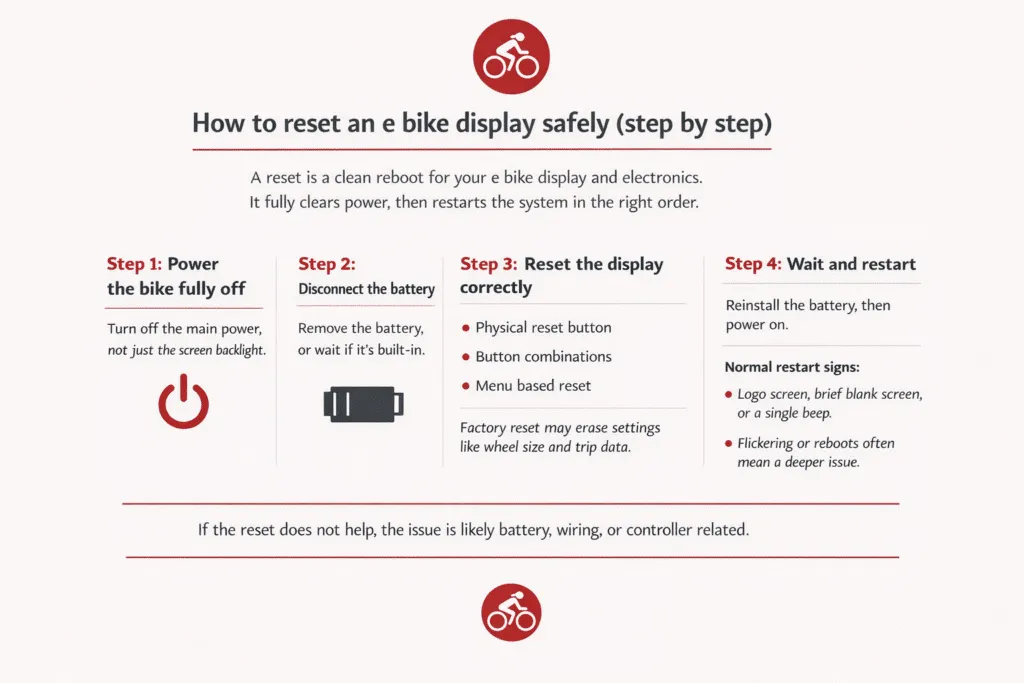
A reset is basically a clean reboot for the display and the bike’s electronics. The goal is to remove power fully, clear any stuck state, then restart in the right order.
Step 1: Power the Bike Fully Off
Turn the bike off using the main power button, not just the backlight on the screen.
Why this matters: Many displays can look “off” while the system is still half awake in the background. A full shutdown stops the controller and display from holding on to a glitch, kind of like closing a frozen app instead of just locking your phone screen.
Step 2: Disconnect the Battery (If Possible)
If your battery is removable, take it out. If it is built in, keep the bike off and wait.
Why this matters: Even after you turn the bike off, there can be a small leftover charge in the system. That little bit of power can keep a problem “stuck” instead of letting it clear. Removing the battery forces everything to go fully dark.
Step 3: Use the Correct Reset Method for Your Display
Now use the reset method your display supports. The goal is a reset, not random button mashing.
- Physical reset button: Some displays have a tiny reset hole or button on the back or side. Use a pen tip or paperclip and press gently.
- Button combinations: Many common displays reset with a button hold like Power + Mode, or Power + Up, held for about 5 to 10 seconds.
- Menu-based reset: Some displays have a reset option inside Settings. This might be called Reset, Restore, or Factory Reset.
Quick caution: A factory reset can erase settings like wheel size, speed limit settings, trip data, and sometimes even odometer-related values, depending on the system. If you see “Factory Reset,” only use it if you are okay with re-entering settings afterward.
Step 4: Wait and Restart
Wait about 30 to 60 seconds, then reinstall the battery and power the bike back on.
What a normal restart looks like: The screen shows the brand logo or a blank screen for a moment, then loads the usual speed and battery display. Some models beep once. That is normal.
If it instantly reboots again, flickers, or powers off by itself, that often points to a deeper issue like a loose connection, low battery voltage under load, or a controller fault.
After the Reset: What to Check Before Riding
A reset can make the screen look normal even if the real problem is still there. Do these quick checks first so you do not get stranded.
- Reseat the battery firmly: Remove it and click it back in. If it feels even slightly loose, the bike can cut power on bumps.
- Check the battery contacts: Look for dirt, moisture, or dull-looking terminals. Wipe gently with a dry cloth. If you see green crusty corrosion, that is a real problem.
- Inspect the display connector: Follow the wire from the display and check the plug. Make sure it is fully seated and not half-connected. A slightly loose plug can cause random shut-offs.
- Look for pin damage: If you unplug a connector, look for bent pins before plugging it back in. Bent pins can cause intermittent issues that come and go.
- Watch for returning error codes: If the same code pops back up within seconds, the reset did not fix anything. It just restarted the error.
- Test under light load first: Lift the rear wheel and gently apply throttle, or do a slow pedal assist roll in a safe spot. If the display dies only when power is demanded, suspect the battery or the power delivery, not the screen.
- Check that readings make sense: Battery bars should not jump wildly. Speed should read smoothly. If the display is still showing nonsense, treat it as an ongoing fault.
If the Reset Did Not Work, Here Is What That Tells You
A failed reset is still useful. It narrows the problem. Here is how I think about it.
1. Likely Battery Issue
This is common when the display works at rest but fails when you start riding.
- The display shuts off when you accelerate or climb a hill.
- Battery bars drop fast under load, then recover when you stop.
- The bike works fine right after charging, then cuts out sooner than it used to.
- The problem gets worse in cold weather.
I have seen bikes reset perfectly on the stand, show a full battery, then shut off halfway up the first hill. In those cases, the display was only reporting what was happening. The battery voltage collapsed under load, and the system cut power to protect itself.
What it usually means: the battery can no longer hold voltage under demand, or the battery connection is not solid.
2. Likely Wiring or Connector Issue
This is common after bumpy rides, transport, rain exposure, or a recent repair.
- The display flickers when you hit bumps or turn the handlebars.
- The bike powers on sometimes, then randomly loses power.
- Wiggling the cable near the display or frame changes the issue.
- You see moisture inside connectors, dirt packed around plugs, or bent pins.
What it usually means: a loose connector, dirty contacts, water intrusion, or a damaged cable.
3. Likely Controller or Sensor Issue
This is more likely when error codes keep coming back instantly.
- The same error code returns right after reset.
- Pedal assist does not engage even though the display is on.
- Throttle does nothing, but the screen looks normal.
- Speed reads zero while moving, or cuts in and out.
What it usually means: a sensor signal is missing, or the controller is throwing a fault the display is only reporting.
4. When the Display Itself Is Actually Faulty
This is less common than people think, but it happens.
- The display will not turn on at all, even with a known good battery and solid connections.
- The screen has dead pixels, water damage marks, or visible cracking.
- Buttons do not respond reliably even after drying and reconnecting.
- The bike runs with a different compatible display but fails with the original one.
What it usually means: the display hardware has failed, or internal moisture damage is causing shorting.
When You Should Stop DIY and Get Help
Most display issues are minor, but there is a point where guessing does more harm than good. Stopping early and getting help can save parts, time, and safety risks.
- The display keeps shutting off while riding, even after multiple resets and battery checks. Repeated power loss can damage connectors or the controller.
- The same error code returns instantly after every reset. That usually means the system is detecting a real fault, not a temporary glitch.
- Your e-bike uses a brand-locked system where resets are limited. These often require dealer software to diagnose or clear errors.
- You notice safety-related problems like sudden motor cutouts, throttle delay, or loss of assist in traffic. These are not issues to experiment with.
How to Reduce Display Problems Long Term
Most display problems are caused by power and moisture, not bad screens. A few simple habits go a long way.
- Keep moisture away from the display and connectors. Light rain is usually fine, but drying the bike after wet rides helps prevent internal corrosion.
- Avoid pressure washing near the display, battery, or wiring. Water forced into connectors causes many long-term faults.
- Check connectors a few times a year. Make sure plugs are fully seated, clean, and free of dirt or green corrosion.
- Store the e-bike indoors when possible, especially in cold or humid conditions. Long storage outside accelerates contact problems.
- Power the bike off before removing the battery. Sudden power cuts during operation can trigger display or controller errors.
Final Words
Resetting an e-bike display is a useful first step when something looks wrong, but it is not a cure for every issue. Most problems come down to power delivery, connections, or system faults the display is only reporting.
Understanding when a reset helps, and when it does not, saves frustration and keeps your e-bike safer to ride.
FAQs
Can a factory reset erase my mileage or settings?
Yes, a factory reset can erase trip data and custom settings like wheel size or assist levels. On some systems, it may also reset odometer-related values. Always check your manual before using a factory reset.
Where is the reset button located?
Some displays have a small reset button on the back or side, while others use button combinations or menu options. The exact method depends on the display model.
Will a reset fix battery level issues?
A reset can fix incorrect battery readings caused by software glitches. It will not fix a battery that is worn out or unable to hold voltage under load.
How often should I reset my display?
Only reset the display when there is a clear problem, like freezing or incorrect readings. Regular resets are not needed and do not improve performance.
Why does my e-bike display keep turning off?
This usually happens due to low battery voltage, loose connections, or overheating. If it turns off only while riding, the issue is often power-related rather than the display itself.

Michael Josh is a hands-on e-bike tester and reviewer at BoltBikers, known for putting every model through real-world rides before sharing his thoughts. With a sharp eye for performance, comfort, and build quality, he helps the team choose which bikes are worth featuring. Backed by years of experience in tech and gear reviews, Michael brings trusted, honest insights to help readers find the right e-bike for their needs.